You've seen it before. The ad platform dashboard shows a strong month: conversions are up, cost-per-acquisition looks healthy, and the campaign appears to be working. Then you open your CRM and the picture looks completely different. Pipeline is thin, closed-won deals don't trace back to the campaigns you thought were performing, and your revenue data tells a story that contradicts almost everything the ad platform reported.
This is the conversion tracking breakdown that quietly undermines budget decisions at B2B SaaS companies every day. It's not a minor discrepancy you can round off. It's a structural problem that causes teams to scale the wrong campaigns, cut the ones that are actually working, and make forecasts based on data that doesn't reflect reality.
The frustrating part is that most teams know something is off. The numbers feel wrong. But diagnosing where the breakdown happens, and more importantly, how to fix it, requires understanding how conversion tracking actually works across the full funnel. That's exactly what this article covers. We'll walk through what conversion tracking is really measuring, where it typically falls apart for B2B SaaS teams, and what a reliable tracking system looks like when it's built correctly.
The Anatomy of a Conversion: What Actually Gets Tracked
Before you can diagnose a tracking problem, you need clarity on what a conversion actually is. In B2B SaaS, the word "conversion" gets used loosely, and that looseness is often where the trouble starts.
A conversion is simply a defined user action that your tracking system captures and records. But not all conversions carry the same weight. A form submission, a demo request, a free trial signup, an MQL trigger in your CRM, and a closed-won deal are all technically conversions. They are also completely different events with different implications for revenue, and they require different tracking approaches.
This is where the distinction between macro and micro conversions becomes critical.
Macro conversions are the actions directly tied to revenue generation. A closed-won deal is the clearest example. A qualified opportunity entering your pipeline is another. These are the events that ultimately justify your ad spend.
Micro conversions are engagement signals that indicate interest or intent but don't directly generate revenue. A content download, a webinar registration, or a pricing page visit all fall into this category. They're valuable signals, but they are not revenue.
The problem arises when teams configure their ad platforms to optimize toward micro conversions without distinguishing them from macro conversions. When you tell a platform like Meta or Google to optimize for "conversions," and those conversions are primarily form fills that rarely progress to pipeline, the algorithm does exactly what you asked. It finds more people who fill out forms. It just doesn't find more customers.
Underneath all of this sits what you can think of as your conversion tracking stack: the combination of tools and methods your system uses to capture conversion signals. Browser-side pixels fire JavaScript in the user's browser when a specific action occurs. Server-side events send signals directly from your server to ad platforms. CRM data captures downstream outcomes like opportunity creation and deal closure. Ad platform signals feed back into campaign optimization algorithms.
Each layer of this stack captures different data at different points in the funnel. A pixel might capture the form fill. Your CRM captures the qualified opportunity. Revenue data captures the closed deal. When these layers aren't connected, you end up with siloed numbers that don't tell a coherent story. Getting the anatomy right is the foundation for everything that follows.
Where the Data Falls Apart: Common Conversion Tracking Failures
Understanding the anatomy of conversion tracking is one thing. Understanding why it breaks in practice is where most B2B SaaS teams find the real answers to their data discrepancies.
The first and most pervasive issue is the declining reliability of browser-side pixel tracking. Pixels have been the default tracking method for years, but the environment they operate in has changed significantly. Safari's Intelligent Tracking Prevention, Firefox's enhanced privacy protections, and widespread ad blocker usage all interfere with pixel-based event capture. When a user's browser blocks or limits the pixel from firing, that conversion event simply disappears from your reporting. It happened. You just don't know about it.
The result is that a meaningful portion of actual conversion events go untracked when you rely exclusively on pixels. Your ad platform reports fewer conversions than actually occurred, your cost-per-conversion looks worse than it is, and optimization algorithms make decisions based on incomplete signals. The platform isn't lying to you. It's just working with less data than it needs. This is one of the most common causes of inaccurate conversion tracking that B2B SaaS teams encounter.
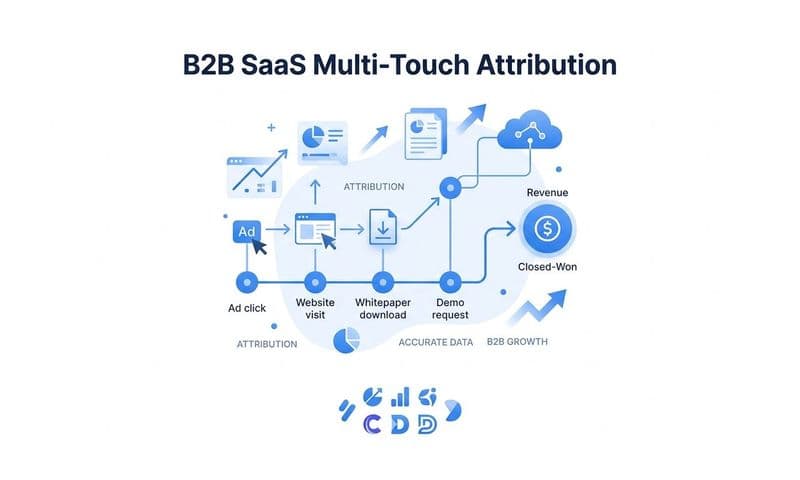
The second failure point is attribution methodology. B2B SaaS buying journeys are rarely a straight line. A prospect might click a LinkedIn ad, read a blog post a week later through organic search, attend a webinar, receive a nurture email, and then convert through a direct visit. That journey could span six to twelve weeks and involve multiple team members from the same account.
Last-click attribution, which is still the default in many ad platforms and analytics tools, assigns 100% of the conversion credit to that final direct visit. Every other touchpoint gets nothing. The LinkedIn ad that started the journey, the content that built trust, the webinar that moved the deal forward: all invisible in the data. This causes teams to systematically over-credit bottom-of-funnel channels and under-credit the awareness and consideration touchpoints that actually created the opportunity.
The third failure is fragmented data sources. Your Meta Ads dashboard, your Google Analytics account, and your CRM are all measuring the same campaigns, but they're measuring different things at different points in the funnel using different attribution logic and different time windows. It's not unusual for these three systems to report three different conversion numbers for the same campaign in the same month. None of them are necessarily wrong. They're just answering different questions, and without a unified view, it's nearly impossible to know which number to trust when making budget decisions.
These three failure modes compound each other. Pixel data loss means fewer events reach your ad platform. Last-click attribution misrepresents which channels drove those events. And fragmented reporting makes it nearly impossible to reconcile the numbers across systems. The conversion tracking breakdown isn't one problem. It's several problems stacked on top of each other. Understanding how to approach fixing conversion tracking gaps requires addressing all of these layers systematically.
Server-Side Tracking and the Conversion API Advantage
The most direct technical response to pixel-based tracking limitations is server-side tracking, and it's become an essential part of any reliable conversion tracking setup for B2B SaaS teams.
Here's the core difference. With pixel-based tracking, the conversion signal originates in the user's browser. If the browser blocks it, the signal never reaches the ad platform. With server-side tracking, the conversion signal originates on your server. When a user completes a defined action, your server sends the event data directly to the ad platform, bypassing the browser entirely. Ad blockers and browser privacy settings have no effect on a server-to-server communication. This is precisely why server-side tracking is more accurate than relying on browser pixels alone.
Meta's Conversions API (CAPI) and Google's Enhanced Conversions are the two most widely used implementations of this approach. Both are documented solutions that allow advertisers to send conversion data server-to-server, improving the completeness and quality of the signals that reach ad platform algorithms.
The benefit goes beyond just recovering lost events. When you send data through the Conversions API, you can include enriched first-party data alongside the conversion signal: hashed email addresses, phone numbers, user IDs, and other identifiers that help the platform match the event to an actual user in its system. This is called event match quality, and it directly affects how well the ad platform's algorithm can optimize your campaigns. Better match quality means the algorithm has a clearer picture of who is converting, which improves targeting and reduces wasted spend. A detailed Conversion API implementation tutorial can walk you through the exact steps to set this up correctly.
There's an important technical nuance to get right when implementing server-side tracking alongside an existing pixel setup: event deduplication. If you're running both a browser pixel and server-side events simultaneously, the same conversion can be reported twice: once by the pixel and once by the server event. Without deduplication logic in place, your reported conversion counts become inflated, your cost-per-conversion looks artificially low, and your campaign optimization is working from distorted data.
Deduplication works by assigning a unique event ID to each conversion and passing that ID through both the pixel and the server event. The ad platform uses the event ID to recognize that both signals refer to the same action and counts it only once. It's a straightforward fix, but it's frequently overlooked during implementation, and the downstream effects on reporting and optimization can be significant.
For B2B SaaS teams serious about fixing their conversion tracking breakdown, implementing server-side tracking with proper deduplication is one of the highest-leverage technical investments available. It doesn't require rebuilding your entire stack. It requires adding a reliable server layer to the tracking you likely already have in place.
Attribution Models and How They Shape Your Conversion Data
Even with clean, complete conversion data flowing into your systems, the attribution model you apply determines how that data gets interpreted. And in B2B SaaS, the wrong model can make a great campaign look mediocre and a mediocre campaign look essential.
Attribution models are simply rules for distributing conversion credit across the touchpoints that preceded a conversion. The major models each follow different logic.
First-touch attribution gives 100% of the credit to the first interaction a prospect had with your brand. It's useful for understanding which channels are generating awareness, but it ignores everything that happened between awareness and conversion.
Last-click attribution gives 100% of the credit to the final touchpoint before conversion. It's the default in many platforms and is easy to understand, but for long B2B sales cycles it systematically misrepresents the channels that actually drove the deal.
Linear attribution distributes credit equally across all touchpoints in the journey. It's more balanced than single-touch models but treats a brand awareness impression the same as a high-intent demo request, which isn't always accurate.
Data-driven attribution uses machine learning to assign credit based on the actual contribution each touchpoint made to conversion outcomes. It requires sufficient data volume to function reliably, but when it works, it provides the most accurate picture of channel performance.
For B2B SaaS companies with sales cycles that span weeks or months, single-touch models are widely recognized among practitioners as insufficient. When a deal involves multiple stakeholders, multiple sessions, and multiple channels, assigning all credit to one touchpoint isn't just inaccurate. It actively misleads budget allocation decisions. Understanding conversion window attribution is an important part of choosing the right model for your sales cycle.
The right attribution model also depends on your sales motion. A product-led growth company where users self-serve through a trial has a fundamentally different conversion journey than an enterprise sales-led business where a BDR follows up on every inbound lead. The former might benefit from time-decay attribution that weights recent touchpoints more heavily. The latter likely needs a model that accounts for the full multi-month journey and reflects the influence of both marketing and sales touchpoints.
The practical implication is this: before you draw conclusions from your conversion data, you need to know which attribution model produced it. The same campaign can appear to drive strong ROI under last-click attribution and appear to underperform under a multi-touch model, or vice versa. Attribution model selection is not a technical detail. It's a strategic decision that shapes every budget conversation your team has.
Connecting Conversion Data to Pipeline and Revenue
Most B2B SaaS marketing teams have some version of conversion tracking in place. The gap that consistently causes the most damage isn't at the top of the funnel. It's between the upstream conversion events that marketing tracks and the downstream revenue outcomes that actually matter to the business.
Tracking a form fill or a trial signup is a starting point, not a finish line. A form fill tells you that someone expressed interest. It doesn't tell you whether that person became a qualified opportunity, whether the deal progressed through the pipeline, or whether it ever closed. When marketing reports on conversions without connecting them to pipeline and revenue, the team is essentially reporting on activity rather than impact.
Closing this loop requires integrating CRM data with your ad platform and analytics data. When you connect these systems, you can trace a specific ad click through to the lead it created, the opportunity that lead became, and the revenue that opportunity generated. Instead of reporting cost-per-lead, you can report cost-per-pipeline and cost-per-closed-won-revenue. Those are the metrics that finance and leadership actually care about, and they're the metrics that justify or challenge your budget allocation. Building a proper attribution tracking setup is what makes this level of visibility possible.
The integration between ad spend data and revenue data also reveals something that lead-level reporting consistently obscures: lead quality by channel. Two channels might generate the same volume of form fills at the same cost-per-lead. But if one channel's leads convert to pipeline at twice the rate and close at a higher average contract value, the two channels have completely different actual ROI. You can only see that when your conversion data is connected to revenue outcomes.
For teams using Stripe or similar payment infrastructure, connecting transaction data to ad campaign data takes this one step further. You can identify which specific campaigns and ad sets are generating not just leads but paying customers, and what revenue those customers represent. This transforms conversion tracking from a marketing metric into a direct input for financial decision-making. Exploring marketing attribution platforms for revenue tracking can help identify the right tools for this integration.
The shift from tracking conversions to tracking revenue impact is where B2B SaaS marketing teams move from being a cost center to being a measurable growth driver. It requires more sophisticated data infrastructure, but the strategic clarity it creates is worth the investment.
Building a Conversion Tracking System That Actually Works
Fixing a conversion tracking breakdown isn't a single fix. It's a system rebuild, and it starts with an honest audit of what your current setup is actually capturing and where the gaps are.
A useful starting point is a cross-platform comparison. Pull conversion numbers for the same campaign from your ad platform, your analytics tool, and your CRM. If the numbers differ significantly, and they almost always do, that gap tells you where data is being lost or miscounted. Pixel events that don't make it through browser restrictions. Sessions that don't get attributed correctly across devices. Leads that enter the CRM without a clear source. Each discrepancy points to a specific failure in your tracking stack.
From there, a reliable conversion tracking system for B2B SaaS typically needs three things working together. First, server-side event tracking to capture conversion signals that pixel-based tracking misses, with proper deduplication to prevent double-counting. Second, first-party data enrichment that passes meaningful user identifiers back to ad platforms through the Conversions API, improving match quality and algorithm optimization. Third, a cross-channel tracking implementation that connects touchpoints across the full customer journey rather than relying on any single platform's native reporting.
The challenge is that most teams try to build this by stitching together multiple tools, each with its own data model and reporting logic. The result is often a new version of the same fragmentation problem they were trying to solve. Reviewing the best practices for tracking conversions accurately can help teams avoid the most common implementation mistakes before they compound.
This is the specific problem that Cometly is built to address. Cometly connects your ad platforms, CRM, and website tracking into a single attribution view, giving B2B SaaS teams a unified source of truth for conversion and revenue data. It captures every touchpoint from the first ad click through to closed-won revenue, integrates with Stripe and CRM data to connect marketing activity to actual pipeline outcomes, and uses AI-driven insights to surface which campaigns and channels are genuinely driving growth. With 70+ native integrations, it's designed to fit into the data infrastructure B2B SaaS teams already have rather than requiring a full stack replacement.
The goal is a system where every conversion event, from a first-touch ad click to a closed deal, is captured accurately, attributed correctly, and connected to the revenue outcome it contributed to. That's what reliable conversion tracking looks like in practice.
Putting It All Together
Conversion tracking is not a single event. It's a connected system, and most B2B SaaS teams are making budget decisions based on data that is incomplete, fragmented, or misattributed at multiple points along the way.
The breakdown usually isn't one thing. It's pixel data lost to browser restrictions. It's last-click attribution that ignores six weeks of touchpoints. It's three different tools reporting three different numbers for the same campaign. It's a form fill being counted as a conversion when the lead never became a qualified opportunity. Each of these is a solvable problem, but only if you can see where in your tracking stack the data is breaking down.
The path forward starts with understanding the anatomy of your conversion events, auditing where your current data is unreliable, implementing server-side tracking to recover lost signals, choosing attribution models that reflect your actual sales motion, and connecting upstream marketing events to downstream revenue outcomes. When those pieces work together, you stop guessing and start making decisions with real confidence.
If you're ready to build that kind of clarity into your marketing data, Get your free demo and see how Cometly gives B2B SaaS growth teams a unified attribution and conversion tracking platform built to capture every touchpoint from first click to closed revenue.