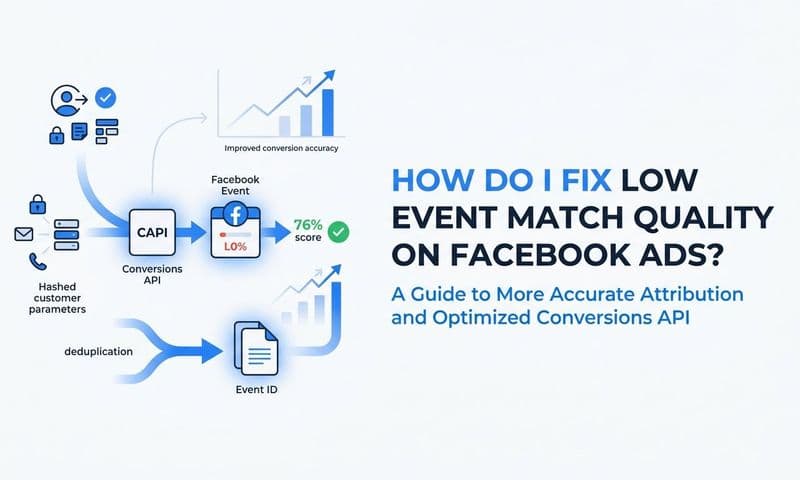
To deduplicate Facebook Pixel and Conversion API events, you assign a unique event_id to every conversion event fired by both your browser pixel and your server-side Conversion API, then Meta uses that shared ID to recognize and discard the duplicate. Without this step, every conversion gets counted twice, which inflates your reported results and causes Meta's algorithm to optimize on bad data.
If you are running paid campaigns and sending events through both the Meta Pixel and CAPI simultaneously, this is not optional. Duplicate events directly distort your cost-per-result, skew your attribution data, and cause ad delivery to optimize toward an inaccurate signal.
The good news is that Meta's deduplication logic is straightforward once you understand the mechanism. A matching event_id on both the browser and server event tells Meta they represent the same conversion, so only one gets counted. What follows is a step-by-step breakdown of how to implement this correctly, verify it is working, and troubleshoot the most common failure points.
This guide is written for B2B SaaS marketing teams, growth leaders, and anyone managing paid campaigns who wants clean, reliable attribution data. Whether you are setting this up manually or using a platform like Cometly, which handles server-side event matching and deduplication automatically as part of its Conversion API integration, the core logic is the same.
Step 1: Understand How Meta's Deduplication Logic Works
Before writing a single line of code, you need to understand exactly what Meta is looking for. The deduplication mechanism is simple in theory but easy to break in practice.
Meta deduplicates events by matching two fields across browser and server events: event_name and event_id. Both must match exactly for deduplication to trigger. If either field is missing or differs between the pixel event and the CAPI event, Meta treats them as two separate conversions and counts both.
The deduplication window is 48 hours. If your server event arrives more than 48 hours after the browser pixel event (or vice versa), Meta will not deduplicate them even if the event_id is a perfect match. This makes real-time or near-real-time server event delivery essential.
Here is what the matching logic looks like in plain terms. Your user completes a purchase. Your browser pixel fires a Purchase event with event_id: "purchase_abc123". Your server simultaneously sends a Purchase event to the Conversions API with the same event_id: "purchase_abc123". Meta receives both, sees the matching event_name and event_id, and counts only one conversion.
A few things to get right from the start:
The event_id must be unique per conversion instance. A single purchase needs one unique ID shared across both channels. It is not a static identifier for the event type. Every individual conversion gets its own ID.
Reusing event_ids is a serious mistake. If you accidentally use the same event_id for two different purchases, Meta will drop the second one as a false duplicate. You will undercount real conversions, which is just as damaging as overcounting.
Missing event_id on either side breaks deduplication entirely. If your pixel fires without an event_id, or your CAPI payload omits it, Meta has no mechanism to link them. Both events get counted independently.
For B2B SaaS companies, the conversion events most commonly requiring deduplication are Lead (form submission), CompleteRegistration (trial signup), Schedule (demo booking), and Purchase (subscription start). Each of these fires from both the browser and the server in a properly configured CAPI setup, making deduplication essential for all of them.
Step 2: Generate a Unique event_id for Every Conversion
The event_id needs to be created at the exact moment the conversion occurs, before either the pixel or the server event fires. This timing matters because both events need to reference the same value, and that value has to exist before either event is sent.
There are two reliable approaches to generating a unique event_id.
Option 1: UUID v4. A UUID v4 is a randomly generated 128-bit identifier that is statistically guaranteed to be unique. Most programming languages and JavaScript environments have native or library-based UUID generators. A generated value looks like this: f47ac10b-58cc-4372-a567-0e02b2c3d479. This is the cleanest approach because it requires no knowledge of the user or the event type.
Option 2: Composite key. Combine a user identifier, a Unix timestamp, and the event type into a single string. An example format: purchase_1234567890_1725638400, where the middle value is the user ID and the last value is the Unix timestamp at the moment of conversion. This approach is readable and debuggable, which makes troubleshooting easier when you are comparing event logs between your frontend and backend.
Whichever method you choose, the generated event_id must be accessible to both your frontend and your backend before either event fires. Common ways to accomplish this:
Session variable: Generate the ID server-side when the user initiates the conversion flow, store it in the session, and pass it to the frontend as a page-level variable.
Data layer push: If you are using Google Tag Manager, push the event_id into the GTM data layer when the conversion is triggered, then reference it in both your pixel tag and your server-side tag.
Cookie: Set a short-lived cookie containing the event_id at the moment of conversion. Your backend can read this cookie when processing the server event.
For B2B SaaS companies tracking demo requests or trial signups specifically, generate the event_id when the form is submitted, not when the page loads. Generating it on page load creates a risk of the same ID being used if the user reloads the page or submits the form multiple times. Tying it to the submission action ensures it maps to a single, intentional conversion.
One more thing: document your event_id generation logic. This sounds minor, but it is one of the most common sources of deduplication failures. A developer who does not know the ID is being used for Meta deduplication can accidentally remove or change the generation logic during a routine update. Write it down, put it in your technical documentation, and make it visible to anyone touching the conversion flow.
Step 3: Pass the event_id to the Meta Pixel (Browser Side)
With your event_id generated and accessible, the next step is passing it correctly to the Meta Pixel in the browser. This is where a specific naming detail trips up a lot of implementations.
In the pixel's fbq() call, the event_id goes inside the fourth argument, which is an options object. The parameter name is eventID with a capital I and D, using camelCase. This is different from the snake_case convention used on the server side, and confusing the two is one of the most common implementation errors.
The correct syntax looks like this:
fbq('track', 'Purchase', {value: 99.00, currency: 'USD'}, {eventID: 'your-unique-event-id-here'});
The first argument is the tracking method. The second is the event name. The third is the custom data object containing any conversion parameters. The fourth is the options object where eventID lives. Do not put the eventID inside the third argument with your conversion data. It belongs in the fourth argument as its own object.
If you are using Google Tag Manager to fire the pixel, the process involves a few extra steps. Create a GTM variable that captures the event_id from your data layer. In your Meta Pixel tag configuration, locate the Additional Data field and add eventID as a key mapped to that variable. When the tag fires, GTM will inject the event_id into the pixel call automatically.
To verify the pixel is receiving the eventID correctly, install the Meta Pixel Helper browser extension. Trigger a test conversion on your site, then open the extension and inspect the event payload. You should see the eventID field populated with the unique string you generated. If it is missing or shows as undefined, the variable reference is broken somewhere in your tag or data layer setup.
One timing issue to watch for: the pixel must not fire before the event_id is generated. If your pixel tag fires on a trigger that executes before your event_id generation logic runs, the eventID field will be empty. Make sure the ID generation happens synchronously before the fbq() call executes. In GTM, you can control this by sequencing tags or using a custom trigger that only fires after the data layer push containing the event_id.
Test this thoroughly before moving to the server side. A pixel that consistently sends the correct eventID is the foundation that makes the rest of the deduplication setup work.
Step 4: Include the event_id in Your Conversion API Server Event
With the browser side configured, you now need to pass the same event_id to your Conversion API server event. Note the naming convention shift: on the server side, the field is event_id in snake_case, not camelCase like the pixel parameter.
A complete CAPI server event payload should include the following fields at minimum:
event_name: Must exactly match the event name used in the pixel call. If the pixel fires "Purchase," the server event must also say "Purchase." Capitalization matters.
event_time: A Unix timestamp representing when the conversion occurred. Use the time of the actual conversion, not the time the server processes the event.
event_id: The exact same string value you passed to the pixel for this conversion instance. Copy it precisely. Any difference, even a single character, breaks deduplication.
user_data: Hashed customer information such as email, phone number, or browser identifiers. This helps Meta match the event to a real user and improves signal quality.
custom_data: Any additional conversion parameters relevant to the event, such as value and currency for a purchase event.
If you are using Meta's Conversions API Gateway, confirm where to pass the event_id in that platform's specific configuration interface. Each integration tool has its own field mapping, and the event_id field is sometimes labeled differently in third-party dashboards.
Send server events as close to real time as possible. The 48-hour deduplication window sounds generous, but delays can accumulate in systems with queuing or batch processing. Events delayed beyond the window will not be deduplicated even if the event_id is a perfect match, and you will end up with double-counted conversions for those cases.
For teams using Cometly, the Conversion API integration handles event_id generation and passes it to both the browser and server layers automatically. This removes the need for manual coordination between frontend and backend teams, which is a significant advantage for B2B SaaS marketing teams that do not have dedicated engineering resources managing the pixel and CAPI setup simultaneously.
Step 5: Test and Verify Deduplication in Meta Events Manager
Implementation without verification is incomplete. Meta provides a built-in testing environment that lets you confirm deduplication is working before your campaigns run on live data.
Navigate to Meta Events Manager, select your pixel, and open the Test Events tab. You will find a test code that you can add to your site URL as a parameter. With the test code active, any events fired from your site will appear in Events Manager in real time, labeled as test events.
Trigger a test conversion on your site. This could be a form submission, a purchase on a staging environment, or any conversion event you have configured for deduplication. Watch the Events Manager interface as the event appears.
A correctly deduplicated setup will show a single event with a note indicating it was received from both browser and server sources. This is the confirmation you are looking for. If you see two separate events with no deduplication note, the event_ids are not matching between your pixel and your CAPI payload.
When that happens, the debugging process is straightforward. Compare the exact string values being sent from both sources. Open the Meta Pixel Helper to see what the pixel sent. Check your server logs or your CAPI integration dashboard to see what the server sent. Look for any difference in capitalization, spacing, or special characters. Even a trailing space can break the match.
Also check the Received Events tab in Events Manager. Filter by your test event_name to see the raw event log, including the event_id values recorded for each event. This gives you a direct view of what Meta actually received, which is more reliable than inferring it from your own logs.
Use the Diagnostics tab in Events Manager to look for active deduplication warnings. These warnings appear when Meta detects that event_ids are being reused across events that should be unique, or when it identifies other patterns suggesting your deduplication setup has a problem. Resolve any active diagnostics warnings before considering the implementation complete.
Step 6: Monitor Ongoing Deduplication Health in Your Attribution Data
Deduplication is not a set-and-forget configuration. Code deployments, tag manager updates, CMS changes, and A/B testing frameworks can all break the event_id handoff between your frontend and backend without anyone realizing it happened.
Set a recurring check in Meta Events Manager's Diagnostics section. Make this a weekly or bi-weekly habit, especially in the weeks following any site update or tag manager change. The Diagnostics tab will surface deduplication errors as they emerge, giving you a chance to catch and fix them before they distort campaign data significantly.
Beyond Events Manager, compare your internal conversion counts against Meta's reported conversions regularly. Your CRM or Cometly's attribution dashboard gives you a ground-truth view of actual leads, signups, and purchases. If Meta is reporting significantly more conversions than your CRM shows, duplicate events are the most likely cause.
In Cometly, you can cross-reference server-side events against CRM pipeline data to confirm that reported conversions map to real leads or revenue. This kind of cross-channel verification is one of the most reliable ways to catch deduplication failures that do not surface as obvious errors in Events Manager. When the numbers diverge, you have a clear signal to investigate.
A few specific scenarios that commonly break deduplication after initial setup:
Tag manager updates: A change to your GTM container that modifies the trigger sequence or the variable reference for event_id can silently break the pixel's eventID parameter.
Frontend framework updates: If your site runs on React, Next.js, or another JavaScript framework, a dependency update can change the timing of when your pixel fires relative to when the event_id is generated.
Backend deployments: A server-side code change that alters how the CAPI payload is constructed can drop the event_id field without triggering any visible error.
Document your event_id generation logic in a shared technical reference that is visible to every developer who touches the conversion flow. Treat it as critical infrastructure, not a minor implementation detail. Future developers who do not know why the ID exists are the most likely people to accidentally remove it.
Related Questions About Facebook Pixel and CAPI Deduplication
What happens if I don't deduplicate Pixel and CAPI events?
Meta counts both events as separate conversions, inflating your reported results and causing the algorithm to optimize on inaccurate data. Your cost-per-result metrics become unreliable, and your budget allocation decisions are based on a signal that does not reflect reality.
Does Meta deduplicate automatically without an event_id?
No. Without a matching event_id on both the browser and server event, Meta has no mechanism to identify them as the same conversion. Deduplication requires an explicit shared identifier. Meta does not infer duplicates based on timing, user identity, or any other signal alone.
How long does Meta's deduplication window last?
Meta deduplicates events that share the same event_name and event_id if both are received within 48 hours of each other. Events that arrive outside this window are treated as independent events and counted separately, even if the event_id matches perfectly.
Can I use the same event_id for different event types?
No. The event_id must be unique per conversion instance. Reusing an ID across different events, or across different users triggering the same event type, will cause legitimate conversions to be incorrectly dropped as false duplicates. Generate a fresh, unique ID for every individual conversion.
Does Cometly handle deduplication automatically?
Yes. Cometly's Conversion API integration generates and syncs event_ids across browser and server layers automatically, so B2B SaaS teams do not need to build custom deduplication logic or coordinate event_id handoffs between frontend and backend engineers. The deduplication workflow is part of the standard CAPI integration setup.
Getting Deduplication Right From the Start
The core rule is simple: one unique event_id per conversion, shared across both the pixel and the CAPI payload. Everything else in this guide is about executing that rule reliably and verifying that it is working.
Before you consider your implementation complete, run through this checklist:
Event_id generated before either event fires: Confirm the ID exists at the moment of conversion, not at page load or after the pixel fires.
Correct parameter name in the pixel: The browser-side pixel uses eventID (camelCase) in the fourth argument of the fbq() call.
Correct field name in the CAPI payload: The server-side event uses event_id (snake_case) in the payload body.
Exact string match between both events: Any difference breaks deduplication. Verify using Meta Pixel Helper and your server logs side by side.
Test verified in Events Manager: A single deduplicated event with a note showing both browser and server sources is the confirmation you need.
Ongoing monitoring in place: Regular Diagnostics checks and cross-referencing against CRM or Cometly attribution data to catch regressions early.
For B2B SaaS teams that want clean attribution data without building custom server-side infrastructure, Cometly's CAPI integration handles the full deduplication workflow. It generates event_ids, syncs them across browser and server layers, and connects your ad data to CRM pipeline and revenue, giving you a single source of truth for what your campaigns are actually driving.
Clean event data feeds Meta's algorithm better signals, which improves targeting accuracy and ad ROI over time. Getting deduplication right is one of the highest-leverage technical improvements a paid media team can make. Get your free demo and see how Cometly's server-side tracking and built-in deduplication can give your campaigns the accurate signal they need to perform.