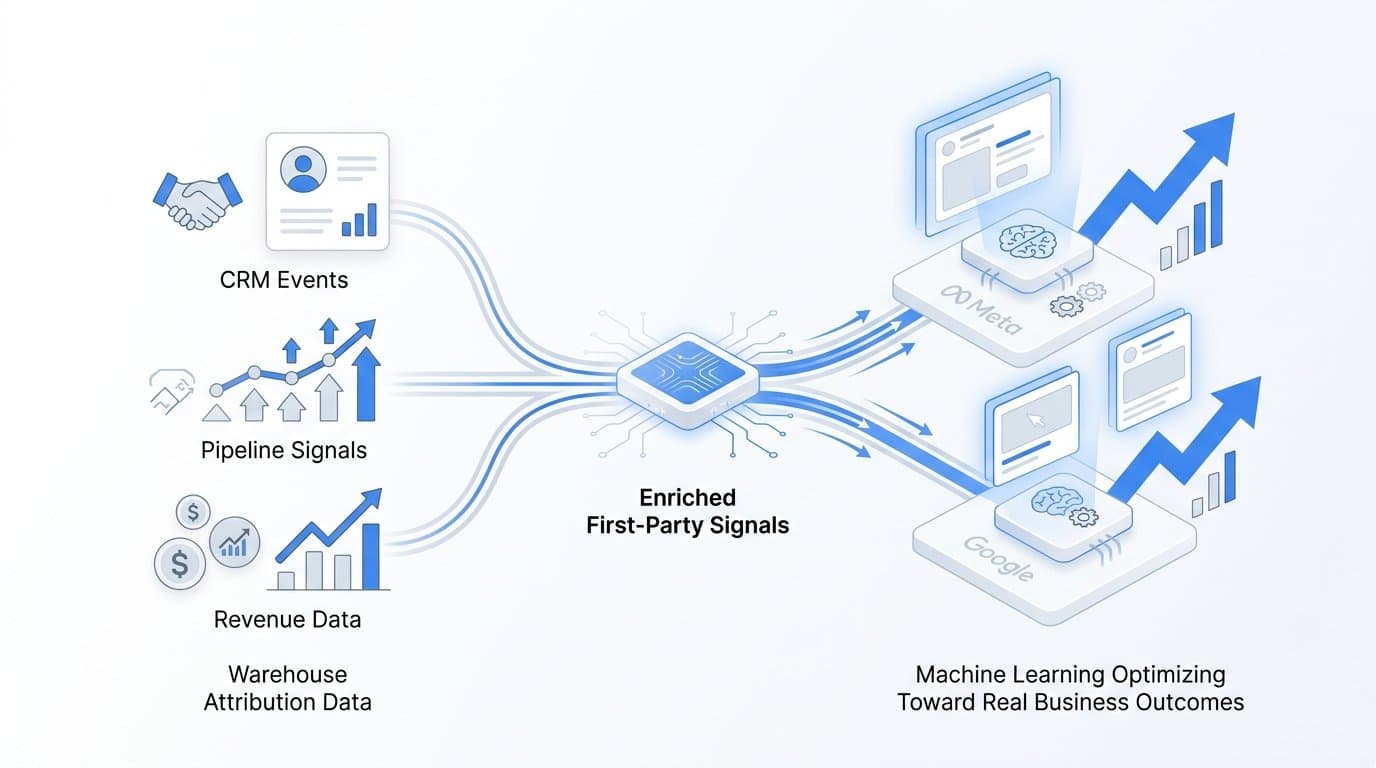
You use warehouse attribution data to power AI ad agents by syncing conversion events, revenue signals, and touchpoint data from your data warehouse directly into ad platforms like Meta and Google, so their machine learning models optimize toward real business outcomes instead of proxy metrics. Cometly makes this practical for B2B SaaS teams by connecting CRM events, pipeline data, and Stripe revenue to your ad platforms through server-side tracking and Conversion API integrations, giving AI ad agents the enriched first-party signals they need to find and convert high-value customers.
The challenge most B2B SaaS marketing teams face is a fundamental disconnect. Your AI ad agents are optimizing toward form fills and page views while your actual business measures pipeline created, opportunities won, and revenue closed. That gap means your ad platform's machine learning is learning the wrong lesson, spending budget to find people who click forms rather than people who become paying customers.
This article covers six specific strategies that turn raw warehouse attribution data into a continuous feedback loop for AI-driven ad optimization. Each strategy builds on the last, progressively increasing the signal quality your AI ad agents have to work with.
1. Define the Conversion Events That Actually Map to Revenue
The Challenge It Solves
Most ad platforms default to optimizing toward whatever conversion event you give them first, and for many B2B SaaS teams, that means form submissions or trial signups. These events are easy to track but weakly correlated with closed revenue. AI ad agents trained on these signals learn to find people who fill out forms, not people who become high-value customers.
The Strategy Explained
Start by auditing your data warehouse for the events that genuinely predict revenue. In a typical B2B SaaS stack, these include pipeline created, opportunity stage advanced, demo completed, and Stripe charge succeeded. These events live in your CRM and payment systems and flow into your warehouse through standard data pipelines.
Map each of these events to a corresponding ad platform conversion goal with an assigned conversion value. Opportunity won is worth more than MQL created. A Stripe charge succeeded event carries the actual contract value. When you assign real dollar values to these conversion events, you shift your AI ad agents from volume optimization to value optimization, which changes who they target and how they bid.
Implementation Steps
1. Pull a list of all conversion events currently tracked in your warehouse, including CRM stage changes, Stripe webhooks, and product activation events.
2. Score each event by its average correlation to closed revenue. Prioritize the two or three events with the strongest predictive relationship.
3. Assign a conversion value to each prioritized event based on average deal size or average revenue per customer at that stage.
4. Map these events to named conversion actions in Meta Events Manager and Google Ads, keeping form fills as secondary signals rather than primary optimization targets.
Pro Tips
If your sales cycle is long, consider using a weighted conversion value that reflects the probability of close at each pipeline stage rather than the full deal value. This gives AI agents a gradient of revenue signal to learn from rather than a binary win or loss at the end of a six-month cycle.
2. Sync First-Party Attribution Data via Conversion API
The Challenge It Solves
Browser-based pixel tracking has become increasingly unreliable. Ad blockers, iOS privacy restrictions, and third-party cookie deprecation all degrade the quality of conversion data that ad platforms receive through traditional JavaScript tags. When your AI ad agents receive incomplete or delayed conversion signals, their optimization models work with a distorted picture of what is actually driving results.
The Strategy Explained
Server-side Conversion API integrations send conversion data directly from your server or data warehouse to ad platforms, bypassing the browser entirely. Meta's Conversions API and Google's Enhanced Conversions are both documented, supported features designed specifically for this use case. Meta's documentation notes that higher Event Match Quality scores, which improve when server-side data includes richer customer identifiers, correlate with better ad delivery performance.
Cometly's server-side tracking layer handles this natively for B2B SaaS teams. Rather than building custom reverse ETL pipelines or managing Conversion API endpoints manually, you connect your CRM and Stripe account once, and Cometly routes enriched conversion events to Meta and Google automatically. This is the foundation that makes every other strategy in this list more effective.
Implementation Steps
1. Audit your current conversion tracking setup to identify which events are browser-based only and which already have server-side coverage.
2. Set up Meta Conversions API or Google Enhanced Conversions for your highest-value conversion events, using customer email, phone, and user ID for matching.
3. Test event match quality scores in Meta Events Manager after setup, aiming for a score that reflects strong customer data matching.
4. Validate that server-side events are deduplicating correctly with any remaining browser-side events to avoid inflating reported conversions.
Pro Tips
Include as many customer identifiers as your privacy policy allows when sending events server-side. Email address, phone number, and external CRM ID all contribute to match quality. Higher match quality means the ad platform can more confidently attribute the conversion to the right ad interaction, which improves the accuracy of your AI agent's learning data.
3. Enrich Conversion Events with Multi-Touch Attribution Context
The Challenge It Solves
Even when you send server-side conversion events, most ad platforms default to last-click attribution internally. In B2B SaaS, where a buying journey might span a LinkedIn ad, a Google search, a retargeting campaign, and a direct visit over several weeks, crediting only the final touchpoint gives your AI ad agents a misleading picture of which channels and campaigns are actually influencing revenue.
The Strategy Explained
Your data warehouse contains the full touchpoint sequence for each converted customer, not just the last interaction. By attaching this multi-touch attribution context to each conversion event before sending it to ad platforms, you give AI agents a richer signal about the channel paths that lead to revenue.
Practically, this means including touchpoint metadata in your Conversion API payloads and using Cometly's multi-touch attribution models to analyze which channel sequences produce the highest conversion rates. You can then weight your conversion values to reflect the influence contribution of each channel rather than assigning full credit to one touchpoint. This helps AI agents in channels like LinkedIn or display, which often influence early in the funnel, receive conversion signal credit that reflects their actual role.
Implementation Steps
1. Pull the full touchpoint sequence from your warehouse for a sample of closed-won customers to identify common channel paths.
2. Choose an attribution model that fits your sales cycle, such as linear, time decay, or position-based, and apply it to assign fractional credit across touchpoints.
3. Include touchpoint source and sequence data as custom parameters in your Conversion API events where the platform supports custom fields.
4. Review your Cometly attribution dashboard to compare how different attribution models change the apparent performance of each channel, and use this to inform budget allocation decisions alongside AI agent optimization.
Pro Tips
Do not try to solve for perfect attribution before taking action. A linear attribution model applied consistently is more useful than no multi-touch model at all. Start with a simple approach, send the enriched data, and refine your model as you accumulate more conversion data in your warehouse.
4. Feed Offline and Pipeline Conversions Back to Ad Platforms
The Challenge It Solves
In B2B SaaS, the gap between an online ad click and a closed deal can span weeks or months and involve multiple stakeholders. If your AI ad agents only see the online portion of the journey, such as the form fill or trial signup, they optimize toward early-stage actions while remaining blind to which of those early actions actually converted to revenue downstream.
The Strategy Explained
Offline conversion uploads close this loop. Both Meta and Google support recurring uploads of offline conversion data that can be matched back to original ad interactions using customer identifiers. When you upload a Stripe closed-won event or a CRM opportunity won record with the original click identifier, the ad platform can retroactively credit the campaign and ad that drove that revenue, even if the conversion happened sixty days after the initial click.
Google's offline conversion import and Meta's offline events both support this workflow. Cometly's pipeline and revenue attribution features connect Stripe and CRM data to ad platform events automatically, so this feedback loop runs on a recurring schedule rather than requiring manual CSV uploads. Over time, AI ad agents accumulate enough downstream revenue signal to shift their optimization from early-funnel volume toward late-funnel value.
Implementation Steps
1. Identify the CRM and revenue events in your warehouse that represent meaningful downstream conversions, specifically pipeline created, demo completed, opportunity won, and Stripe charge succeeded.
2. Ensure each event record includes the original click ID from the ad platform, typically gclid for Google or fbclid for Meta, captured at the time of the initial website visit.
3. Set up a recurring sync that uploads these offline events to Meta and Google on a daily or weekly schedule, matching on click ID and customer email.
4. Monitor the reported conversion values in your ad platform dashboards to confirm downstream events are being matched and credited correctly.
Pro Tips
Capture click IDs at the moment of the first website interaction and store them in your CRM alongside the lead record. This is the single most important technical step for making offline conversion uploads work. Without the original click ID, match rates drop significantly and the feedback loop loses much of its value.
5. Segment Audiences Using Warehouse Signals for AI Targeting
The Challenge It Solves
Lookalike audiences built from broad website visitor pools give AI ad agents a weak seed to work from. Website visitors include competitors researching your pricing, job seekers reading your careers page, and existing customers checking their account. When you ask Meta or Google to find more people like your website visitors, you get a diffuse signal that does not accurately represent your best customers.
The Strategy Explained
Your data warehouse contains a far more precise definition of your best customers: actual revenue, deal size, product usage depth, and time to close. By building customer lists from these warehouse-derived signals and uploading them as seed audiences for lookalike expansion, you give AI ad agents a much sharper profile to match against.
The practical approach is to segment your closed-won customer base by revenue tier or product tier, export the top segment as a customer list with email and phone identifiers, and upload it to Meta and Google as a custom audience. From there, you enable lookalike expansion and let the AI agents find prospects who resemble your highest-revenue customers rather than your average website visitor. Suppression lists from your warehouse, such as current customers and active pipeline, prevent your budget from being spent on people already in your funnel.
Implementation Steps
1. Query your warehouse for customers above a revenue threshold that represents your ideal customer profile, using actual Stripe revenue or CRM deal value as the filter.
2. Export this list with hashed email addresses and phone numbers for privacy-safe upload to Meta and Google.
3. Create a lookalike audience in Meta Ads Manager and a similar audience in Google Ads using this high-revenue customer list as the seed.
4. Build a suppression audience from your warehouse that includes current customers, active pipeline, and recent trial users, and apply it to all prospecting campaigns.
Pro Tips
Refresh your customer lists on a regular cadence, at least monthly, to keep the seed audience current as new customers close and existing customers churn. Stale seed audiences gradually dilute the signal quality that AI agents use for lookalike matching. Cometly's customer journey analytics can help you identify which customer segments share the highest revenue and shortest sales cycles, making them the strongest seed for lookalike expansion.
6. Monitor Attribution Feedback Loops with a Unified Dashboard
The Challenge It Solves
Sending enriched warehouse data to ad platforms is only useful if you can verify that it is actually improving AI agent performance. Without a unified view that connects ad spend to pipeline and revenue, you are flying blind on whether your server-side events are matching correctly, whether your offline conversions are being credited, and whether your AI agents are actually finding higher-value customers as a result.
The Strategy Explained
A unified attribution dashboard brings together the metrics that matter for this feedback loop: event match quality scores from Meta and Google, conversion values reported by each ad platform, cost per pipeline stage, and cost per closed-won customer. When these metrics move together in the right direction, you have evidence that your warehouse attribution data is improving AI agent performance. When they diverge, you have a signal that something in the data pipeline needs attention.
Cometly's attribution dashboard is built for exactly this use case. It connects ad platform data, CRM pipeline stages, and Stripe revenue into a single view, so you can see cost per opportunity and cost per closed-won customer alongside the ad spend that drove them. This is the layer that makes the other five strategies measurable rather than theoretical. Without it, you are sending data into ad platforms and hoping for the best.
Implementation Steps
1. Set up a dashboard that tracks event match quality scores in Meta Events Manager and conversion match rates in Google Ads on a weekly basis.
2. Add pipeline-stage metrics to your reporting: cost per MQL, cost per SQL, cost per opportunity created, and cost per closed-won customer broken down by campaign and channel.
3. Compare these pipeline metrics against the surface-level metrics your ad platforms report, such as cost per lead and conversion rate, to identify gaps between what platforms claim and what your CRM confirms.
4. Set a monthly review cadence to assess whether enriched warehouse signals are improving downstream pipeline metrics over time, and use this to guide budget allocation decisions.
Pro Tips
Pay particular attention to the gap between ad platform reported conversions and CRM confirmed conversions. A large gap often indicates attribution issues, such as duplicate counting, poor match rates, or conversion events that do not actually correlate with revenue. Closing this gap is one of the highest-leverage activities for improving AI agent performance over time.
Your Implementation Roadmap
The six strategies above work best when applied in sequence rather than all at once. Each layer adds signal quality that the next layer depends on.
Start with strategy one: define the revenue events in your warehouse that actually signal customer value. Without clear event definitions tied to real business outcomes, every other strategy optimizes toward the wrong target. Then move to server-side Conversion API setup, which ensures those events reach ad platforms reliably and with high match quality.
From there, attribution enrichment and offline conversion uploads add depth and downstream revenue signal to what AI agents learn from. Audience segmentation from warehouse data sharpens who AI agents target. And unified dashboard monitoring closes the loop by making the entire feedback system measurable and improvable over time.
Teams using Cometly can connect their CRM, Stripe account, and ad platforms in one place, so every strategy in this list runs through a single attribution layer rather than a patchwork of separate tools. The result is AI ad agents that optimize toward closed revenue, not just clicks.
If you are ready to connect your warehouse attribution data to your ad platforms and give your AI ad agents the signal quality they need to find and convert high-value customers, Get your free demo today and start capturing every touchpoint to maximize your conversions.