If you are running paid ads and relying on pixel-based conversion tracking, iOS privacy changes have likely introduced significant gaps in your data. Since Apple's App Tracking Transparency framework rolled out, browsers and apps on iOS devices restrict third-party cookies and limit the data ad platforms can collect. The result is underreported conversions, distorted attribution, and ad algorithms that optimize on incomplete signals.
For B2B SaaS marketing teams, this is not a minor inconvenience. When your Meta or Google campaigns are making bidding decisions based on a fraction of your actual conversions, you are wasting budget and misreading performance.
The good news is that inaccurate conversion tracking on iOS is a solvable problem. It does not require abandoning your ad stack or rebuilding your entire analytics setup from scratch. It requires a structured approach: understanding where the data gaps exist, shifting to server-side tracking, configuring the right signals, and validating your data quality at every step.
This guide walks you through exactly that process. You will learn how to audit your current tracking setup, implement server-side conversion APIs, configure first-party data strategies, and verify that your attribution is accurately reflecting what is actually happening in your pipeline.
Whether you are a growth marketer managing Meta and Google campaigns or a marketing ops leader responsible for attribution accuracy, these steps will help you recover lost conversion data and feed your ad platforms the enriched signals they need to perform. Let us get into it.
Step 1: Audit Your Current Conversion Tracking Setup
Before you fix anything, you need to understand exactly what is broken. Most teams discover their iOS tracking gaps not through proactive auditing but through a nagging sense that their numbers do not add up. Start by making that feeling concrete.
Begin by documenting every conversion event you are currently tracking. List each event, the platform it is tracked in (Meta, Google, or both), and how it fires: client-side pixel, server-side Conversion API, or a combination. This inventory gives you a clear starting point and often reveals events that were set up years ago and never revisited.
Next, pull your conversion volume from your ad platform and compare it directly against your CRM or backend data for the same time period. If Meta reports 80 leads in a given month but your CRM shows 140, that gap is your problem statement. Document it precisely. The size and consistency of that gap will tell you how severe your iOS tracking loss is.
Inside Meta Events Manager, check your Event Match Quality scores for each conversion event. Meta scores these from zero to ten, and anything below seven typically indicates that the events arriving at Meta lack enough customer data to be reliably matched to users. Low scores often correlate with iOS gaps because iOS users are less likely to be identified through browser-based signals.
In Google Ads, navigate to your conversion diagnostics report. Look for warnings about inactive tags, low-quality conversion data, or events that are not being attributed correctly. Google surfaces these issues clearly, but many teams never look at this report.
Finally, filter your analytics platform by device type and compare conversion rates between iOS and non-iOS users. If your iOS conversion rate looks suspiciously low compared to Android or desktop, that is a strong signal that iOS events are dropping before they reach your ad platform.
Common pitfall: Many teams assume their pixel is working because it shows some data. iOS gaps are often invisible unless you actively compare ad platform data against CRM or Stripe revenue data. Some conversions are being reported. The ones that are not reporting are the problem.
Success indicator: You have a documented conversion volume discrepancy between your ad platform and your CRM, with a rough estimate of how many conversions are being lost each month.
Step 2: Understand Why iOS Breaks Pixel-Based Tracking
To fix this problem properly, your team needs to understand the root cause. This is not just a technical detail. It is the foundation that justifies the investment in server-side infrastructure and helps you explain the issue clearly to stakeholders who control budget.
Apple introduced the App Tracking Transparency framework to give users explicit control over whether apps can track them across other apps and websites. When a user opts out, apps cannot access the device's advertising identifier. But the impact on web-based tracking goes further than app behavior.
Safari's Intelligent Tracking Prevention, which has been evolving for several years, aggressively limits the lifespan of third-party cookies. In many cases, third-party cookies are blocked entirely in Safari on iOS. Since the Meta pixel and Google tag rely on cookies to identify users and attribute conversions back to ad clicks, any iOS user browsing in Safari is largely invisible to those pixels after their first session.
This affects all browser-based tracking on iOS, not just tracking within apps. A user who clicks your Meta ad, visits your site in Safari, and submits a form two days later may never be attributed to that campaign. The cookie that would have connected their form submission back to the original ad click has already expired or was never set.
Meta responded to these restrictions by shortening its default attribution window. The platform moved from a 28-day click window to a 7-day click window for campaigns affected by iOS restrictions. This means that even when a conversion does get reported, it may not be connected to the correct campaign if the conversion happened more than seven days after the click.
The downstream effect on ad algorithms is significant. Meta and Google use reported conversions to train their bidding models. When iOS conversions are systematically missing from that signal, the algorithm believes certain campaigns, audiences, or creatives are underperforming. It pulls budget away from them. This creates a compounding problem where your best-performing campaigns may be underfunded because their iOS-driven results are not being counted.
Success indicator: Your team can clearly explain the root cause to a non-technical stakeholder and articulate why a pixel fix alone will not solve the problem.
Step 3: Implement Server-Side Conversion Tracking via Conversion APIs
This is the most technically involved step, and it is also the most important. Server-side conversion tracking is the industry-standard solution for recovering iOS conversion data, and it works because it bypasses the browser entirely.
Here is the core difference: a client-side pixel fires from the user's browser. When iOS blocks or restricts the relevant cookies, that event either does not fire or arrives at the ad platform without enough data to be matched to a user. A server-side Conversion API event fires from your server. It does not pass through the user's browser at all, which means iOS privacy restrictions have no effect on it.
Setting up Meta Conversion API: Start in Meta Events Manager. Navigate to your pixel settings and select the Conversions API option. You will need to create a system user in your Meta Business Manager and generate an access token for that user. This token authenticates your server's requests to Meta's API. Once you have the token, you can send conversion events directly from your server using Meta's API endpoints. Each event should include the event name, the timestamp, and as many customer data parameters as you have available.
Customer data parameters matter enormously here. When you send a hashed email address, phone number, or name alongside a conversion event, Meta can match that event to a user in its system with much higher confidence. This is what drives your Event Match Quality score up. Hash these values using SHA-256 before sending them. Meta's documentation specifies the exact format required.
Google Enhanced Conversions works on the same principle for Google Ads. When a user converts on your site, you send their hashed email address to Google alongside the conversion event. Google uses that email to match the conversion to a signed-in Google account, which is not affected by cookie restrictions. You can implement Enhanced Conversions through Google Tag Manager or directly via the Google Ads API.
Event deduplication is non-negotiable. The recommended setup is to run both your client-side pixel and your server-side Conversion API simultaneously. The pixel captures events from users where cookies are still working, and the CAPI captures events from users where they are not. But this means some conversions will be reported by both the pixel and the CAPI. Without deduplication, you will count those conversions twice.
Both Meta and Google handle deduplication through event IDs. When your pixel fires a conversion event, generate a unique event ID and pass it with the pixel event. When your server sends the corresponding CAPI event for the same conversion, send the same event ID. The platform uses that ID to identify the duplicate and count the conversion only once.
Common pitfall: Sending CAPI events without deduplication logic will inflate your reported conversions and corrupt the bidding signals you are trying to improve. Set up deduplication before you go live.
Success indicator: Your Event Match Quality score in Meta Events Manager is improving, your CAPI events are showing as received and processed, and your total reported conversion volume is moving closer to your CRM data without showing obvious inflation.
Step 4: Build a First-Party Data Collection Strategy
Server-side tracking solves the transmission problem. First-party data solves the attribution problem. These two strategies work together, and skipping the first-party data layer will limit how much value you get from your Conversion API implementation.
First-party data refers to information you collect directly from your users through your own properties. In the context of conversion tracking, this primarily means capturing UTM parameters, click IDs, and customer identifiers at the moment a user arrives on your site and storing them in a way that persists through the conversion event.
Capturing and storing UTM parameters: When a user lands on your site from an ad, their URL contains UTM parameters that identify the source, medium, campaign, and often the specific ad or keyword. Your site should read these parameters from the URL and store them in a first-party cookie or in your server-side session data immediately on page load. When that user submits a form, your form handler should pull those stored values and include them in the CRM record it creates.
This gives you source attribution that is independent of ad platform reporting. Even if Meta never receives the conversion event from its pixel, your CRM record will show that this lead came from a specific Meta campaign. That is a reliable audit trail.
Capturing fbclid and gclid parameters: When a user clicks a Meta ad, Meta appends an fbclid parameter to the landing page URL. Google does the same with gclid. These click IDs are the most precise attribution signals available because they tie directly back to a specific ad click in the ad platform's system. Capture these parameters exactly the same way you capture UTMs: read them from the URL on page load, store them, and pass them through to your CRM at form submission.
When you send a CAPI event that includes the fbclid from the original click, Meta can attribute that conversion to the exact campaign, ad set, and ad that drove it. This is far more precise than cookie-based attribution and it works regardless of how much time has passed since the click.
Enriching conversion events with email addresses: When a user submits a form, you now have their email address. Include that hashed email in every server-side conversion event you send. This is what drives high Event Match Quality scores and enables the ad platform to connect the conversion to the correct user account.
Tip: Storing click IDs and UTM data in your CRM creates a direct connection between ad clicks and pipeline events that does not depend on browser cookies at all. Even in a world where all cookies are blocked, this first-party data layer preserves your attribution.
Success indicator: Your CRM records consistently include source, medium, campaign, and ad click ID fields for a high percentage of new leads. When you filter your CRM by lead source, the numbers align reasonably well with what your ad platforms report.
Step 5: Configure Attribution Models That Reflect the Full Customer Journey
With your tracking foundation rebuilt, you are now in a position to look at attribution more strategically. The data you are collecting is richer and more complete than before. The question now is how you interpret it.
Last-click attribution was already a blunt instrument before iOS changes. It became significantly less reliable afterward. Here is why: iOS restrictions disproportionately affect early-funnel touchpoints. A user might first encounter your brand through a Meta awareness ad on their iPhone, then research you through an organic search on their laptop, and finally convert after clicking a retargeting ad. Under last-click attribution, the retargeting ad gets all the credit. But under iOS restrictions, even that model breaks down because the early touchpoints on iOS are often not captured at all, making it impossible to understand the full journey.
Multi-touch attribution models distribute credit across all the touchpoints that contributed to a conversion. Linear models give equal credit to every touchpoint. Time-decay models give more credit to touchpoints closer to the conversion. Position-based models give extra credit to the first and last touchpoints. Each model tells a different story about your funnel, and comparing them reveals which channels are genuinely driving demand versus which ones are just closing deals that other channels started.
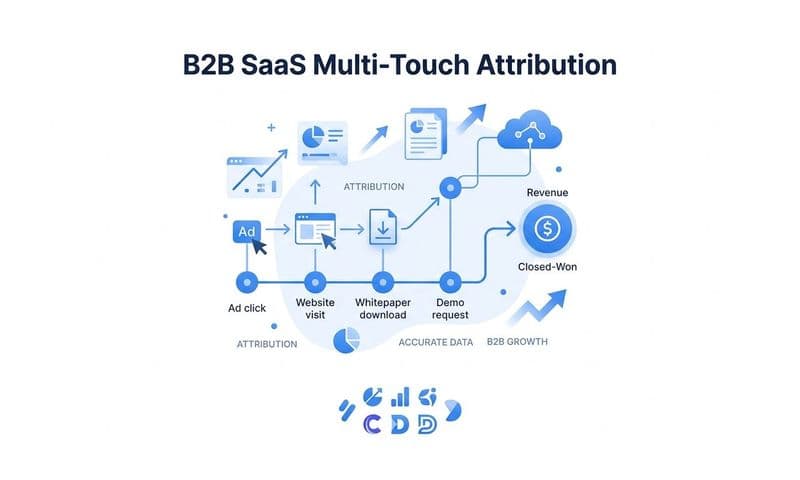
To implement multi-touch attribution effectively, you need a platform that can ingest data from multiple sources: your ad platforms, your CRM, and your revenue data. This is where a dedicated attribution platform becomes valuable. By connecting your ad click data, form submission events, CRM pipeline stages, and closed revenue in one place, you can see attribution across the full funnel from first ad click through to closed-won deal.
Server-side tracking makes this significantly more powerful. Because your touchpoints are captured independently of browser behavior, your attribution dataset is more complete. The model has more data to work with, which means its credit distribution is more accurate.
Tip: Data-driven attribution models, which use machine learning to assign credit based on actual conversion patterns in your data, work best when the underlying dataset is complete and enriched. Every improvement you made in the earlier steps feeds directly into the quality of your attribution model here.
Success indicator: You can view attribution data across the full funnel from first ad click through to pipeline creation and closed revenue, and you can compare how different models allocate credit across your channels.
Step 6: Validate Your Data and Close Remaining Gaps
Implementation is not the finish line. Validation is. Even a well-configured server-side tracking setup can develop gaps over time as your site changes, your ad platforms update their APIs, or new conversion events are added without proper instrumentation. Building a validation practice into your workflow is what separates teams that maintain accurate attribution from teams that drift back into the same problems.
Start with a data reconciliation check. Pull your reported conversions from your ad platform for a given time period, then pull your CRM-recorded leads for the same period filtered by the same ad source. The numbers will rarely match perfectly, but they should be close and the gap should be explainable. A large, unexplained gap is a signal that something in your tracking pipeline has broken.
Use your UTM-based source tracking in your CRM as a secondary validation layer. If your CRM shows 50 leads attributed to a specific Meta campaign but Meta only reports 30 conversions for that campaign, the discrepancy tells you that your server-side events may not be firing correctly or that your event match quality is too low for Meta to attribute those conversions to the right campaign.
Watch for anomalies in your reporting. A sudden drop in reported conversions that is not matched by a drop in CRM leads usually indicates a tracking implementation issue. An unusually high or low Event Match Quality score is worth investigating immediately. These signals are often the first indication of a problem before it compounds.
Segment your analytics data by device type regularly and compare iOS conversion rates against other devices. If iOS conversion rates drop significantly relative to other devices without a corresponding change in your ad targeting or creative, your tracking setup may have developed a new gap.
Ad platforms like Meta provide modeled conversions as a supplementary signal. These are statistically estimated conversions that Meta believes occurred but could not directly observe due to privacy restrictions. Use these as context, not as a primary source of truth. Your CRM data and server-side events are your ground truth.
Tip: Validation is not a one-time task. Build a monthly reconciliation review into your reporting process. Assign someone ownership of the audit so it actually happens.
Success indicator: The gap between your ad platform reported conversions and your CRM-recorded conversions is consistently small, stable, and explainable by factors you understand, such as time zone differences or attribution window settings.
Putting It All Together
Fixing inaccurate conversion tracking on iOS is not a single fix. It is a layered approach that builds on itself. Here is the process in summary:
1. Audit your setup. Quantify the gap between ad platform reported conversions and CRM data. Understand the size of your problem before you start solving it.
2. Understand the root cause. iOS privacy restrictions block the browser-based signals that pixels depend on. Your team needs to understand this clearly to justify and execute the right solution.
3. Implement server-side tracking. Set up Meta Conversion API and Google Enhanced Conversions. Include customer data parameters, implement event deduplication, and verify that events are being received and matched correctly.
4. Build a first-party data layer. Capture UTM parameters and click IDs at the point of landing and pass them through to your CRM at form submission. This creates an attribution trail that does not depend on cookies.
5. Configure multi-touch attribution. Use a platform that connects ad data, CRM events, and revenue data so you can see the full customer journey and compare attribution models.
6. Validate continuously. Run monthly reconciliation checks and monitor for anomalies. Attribution accuracy degrades over time without active maintenance.
Platforms like Cometly are built specifically for this workflow. Cometly connects your ad platforms, CRM, and revenue data into a single attribution view that is not dependent on client-side cookies. It captures every touchpoint from first ad click through to closed revenue, feeds enriched conversion signals back to Meta and Google, and gives your team the complete picture it needs to make confident budget decisions.
The best place to start is Step 1. Run your audit, quantify your gap, and let that data drive the urgency and scope of your implementation. The gap is almost certainly larger than you expect.
Inaccurate conversion tracking on iOS is a systemic problem that requires a systemic solution. The steps in this guide give you that solution: audit your current setup, understand the root cause, implement server-side conversion tracking through Meta Conversion API and Google Enhanced Conversions, build a first-party data collection layer that stores UTMs and click IDs in your CRM, configure multi-touch attribution models that reflect the full customer journey, and validate your data on an ongoing basis.
None of these steps work in isolation. Each one builds on the previous. But together, they close the gap between what your ad platforms report and what is actually happening in your pipeline. That gap is costing you budget efficiency, campaign performance, and strategic clarity.
Cometly is the attribution layer that connects every touchpoint to revenue without relying on browser-based tracking. It is built for B2B SaaS marketing teams that need accurate, complete data to scale their campaigns with confidence. From capturing first-touch ad clicks to connecting them to closed-won revenue in your CRM, Cometly gives you the single source of truth your team needs.
Start your audit today. Identify your current data gap. Then work through these steps to build a tracking foundation that actually reflects your results. When you are ready to bring it all together in one platform, Get your free demo and see how Cometly can transform the accuracy and depth of your attribution data.